Strike guide
Copy trading on Strike: how to copy a trader, step by step
How copying a Hyperliquid wallet or a Strike trader works, fixed ratio against fixed margin, the stop loss and caps that limit a copy. Strike guide F2.
Not affiliated with Strike. Not financial advice.
In one minute
- What it is: you pick a trader, and Strike places a matching trade on your account each time one of theirs fills.
- Who it's for: people who would rather follow a trader they have checked than pick every trade themselves.
- The one thing to know: a copy trades with your size, your leverage and your limits. Set them before the first trade, not after the first loss.
What is copy trading on Strike?
Copy trading follows a lead, the trader you copy, on your own account. When the lead's trade fills, Strike sends a matching market order on your account, usually within seconds. Copying starts from the moment you subscribe.
You can copy two kinds of lead:
- Hyperliquid wallets. Every trade on Hyperliquid, a large exchange, is public. Strike copies a wallet's trades in the markets it lists and skips the rest.
- Strike traders. Every trade they make on Strike is copied, including fills of their stop-loss and take-profit orders.
When the lead closes part of a position, your copy closes the same share of yours. That holds even when the lead is liquidated.
Fixed ratio or fixed margin
| Mode | You set | Each copied trade |
|---|---|---|
| Fixed Ratio | A total allocation, such as $5,000 | The same share of the lead's account. A lead with $100,000 buying 0.1 BTC means you buy 0.005 BTC. |
| Fixed Margin | A margin per trade, such as $50 | That margin times your leverage. $50 at 10x is a $500 position, whatever size the lead trades. |
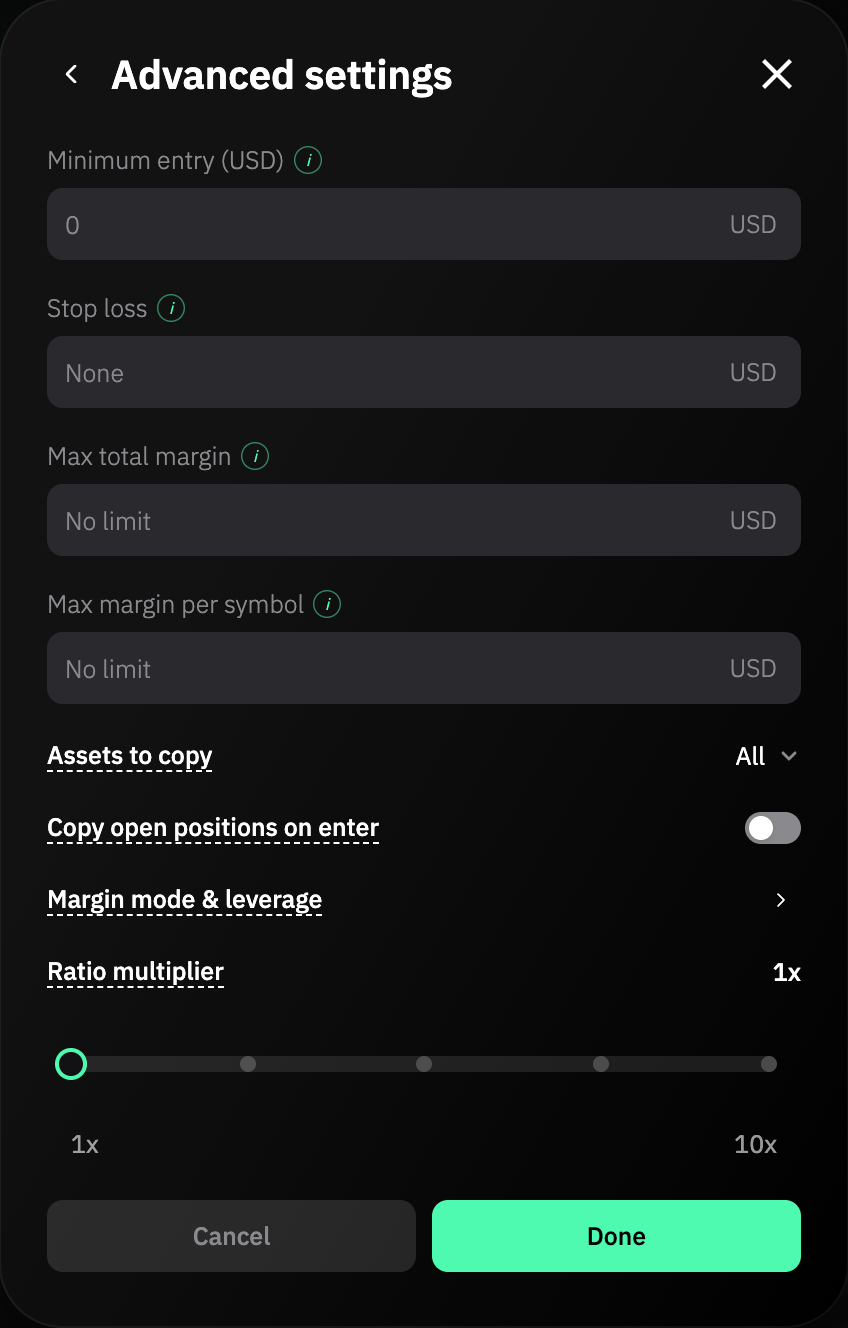
Fixed ratio sets your whole allocation aside while the copy runs. If the lead's account is far bigger than yours, some trades come out too small to place and are skipped. Two settings work in this mode only. A ratio multiplier of 1x to 10x scales every copied entry up, and a minimum entry lifts small entries to a trade value you set.
Fixed margin sets nothing aside. Each new order the lead opens or adds to is a fresh full entry. If your balance can't cover one, it is skipped, not made smaller.
The limits in Advanced settings
- Stop loss closes every position in the copy at market and stops copying once the copy's loss reaches the amount you set. Fast markets and funding can push the final loss past it.
- Max total margin caps the margin the copy holds across all markets.
- Max margin per symbol caps it in any one market.
- Assets to copy lets you untick markets the copy must not open.
An entry that would break a cap is skipped whole, and closes are never blocked.
Who it's for
- You don't have time to watch charts. A copy trades while you work or sleep.
- You're learning. You see an experienced trader's entries and exits on your own account.
- You trade, but want a second strategy. Run the copy in a sub-account, a separate account with its own balance, beside your own trading.
How to copy a trader
- Make a sub-account and move in only what you're willing to lose. New accounts start on cross margin, so set its default to isolated before the first copy.
- Find a trader. Open Copy Trading and browse Discover, or search for a wallet address. Each profile shows the markets traded, a trading style and a copy score.
- Pick a mode and a size, then open Advanced settings and set a stop loss and your caps.
- Set your leverage under Margin mode & leverage on the same screen. Copies use your leverage, not the lead's, and the first trade in a market locks it in for that position.
- Confirm, then track it on your copy dashboard: every copied order, its positions and the profit or loss.
- Stop when you want out. Stopping closes the copied positions at market and leaves your own trades alone.
A worked example
This is an example, not a suggestion. You move $500 into a sub-account, set isolated margin and 5x leverage, and copy at $25 margin per trade. Each copied trade is a $125 position. A $100 max total margin means at most four are open at once, and a $75 stop loss ends the copy if it ever loses that much.
If one trade moves 4% against you, it is down about $5. The $400 not in open trades stays in the account. Fees are left out to keep the sums simple.
Things worth knowing
- Margin per trade is not a loss cap. On cross margin, losses can go past it.
- Copies can be skipped. It happens when your balance is short, a cap is reached or the size breaks a market's minimum. The copy keeps running.
- Liquidations don't stop a copy. If one of your positions is liquidated, the lead's later trades are still copied. Only you, or the stop loss you set, can stop it.
- Strike traders take 10% of your profit when you stop a copy in profit. Losses aren't shared, and Hyperliquid wallets take nothing.
- Earlier subscribers fill first. When many people copy one lead, their orders go in the order they subscribed.
- Some trades are never copied. Grid bot and TWAP orders, and trades in markets Strike doesn't list, are skipped.
- Your results will differ from the lead's. Different size, leverage and timing give different numbers.
Questions people ask
Can I copy any Hyperliquid wallet?
Yes, any wallet that isn't a vault. Only its trades in markets Strike lists are copied.
Does margin per trade cap my loss?
No. It sets the size of each entry, and the stop loss in Advanced settings is what ends a copy at a loss you choose.
What happens if the trader I copy is liquidated?
Your copy of that position closes by the same fraction. The copy stays active and keeps following their later trades.
Can I change a copy after I start it?
You can change the amount, the caps and the markets at any time, and the changes apply to future entries. To change the mode, stop the copy and start a new one.
How I use it
I don't trade by hand, so copy trading is how I use Strike. I copy Hyperliquid wallets on fixed margin, with every market set to isolated at low leverage before the first copy, and a cap per market and in total. Before I copy anyone I read their full trade history, and I decide in advance what losing run would make me stop.
Next
- New to these terms? Start with What is a perp? and Long, short and leverage
- Before copying with leverage: Liquidation, and how to avoid it
- Check a wallet before you copy it: Copilot Check (my free tool)
- Official docs: Copy Trading and Sub-accounts
- Try it: open Strike (my referral link, 5% off fees)
Not financial advice.